rule-engine
Rule Engine — Visual Editor
The ruleengine-ui module is a Compose Desktop application for authoring rule projects: schema,
actions and rules, with validation and evaluation against sample input.
Rules stay plain .rule text at all times. The editor reads and writes the same files you would write
by hand, so switching between the visual builder and the code view is lossless.
Running it
From the project root:
./gradlew :ruleengine-ui:run
Run the tests:
./gradlew :ruleengine-core:test :ruleengine-ui:jvmTest
Build everything:
./gradlew build
What it looks like
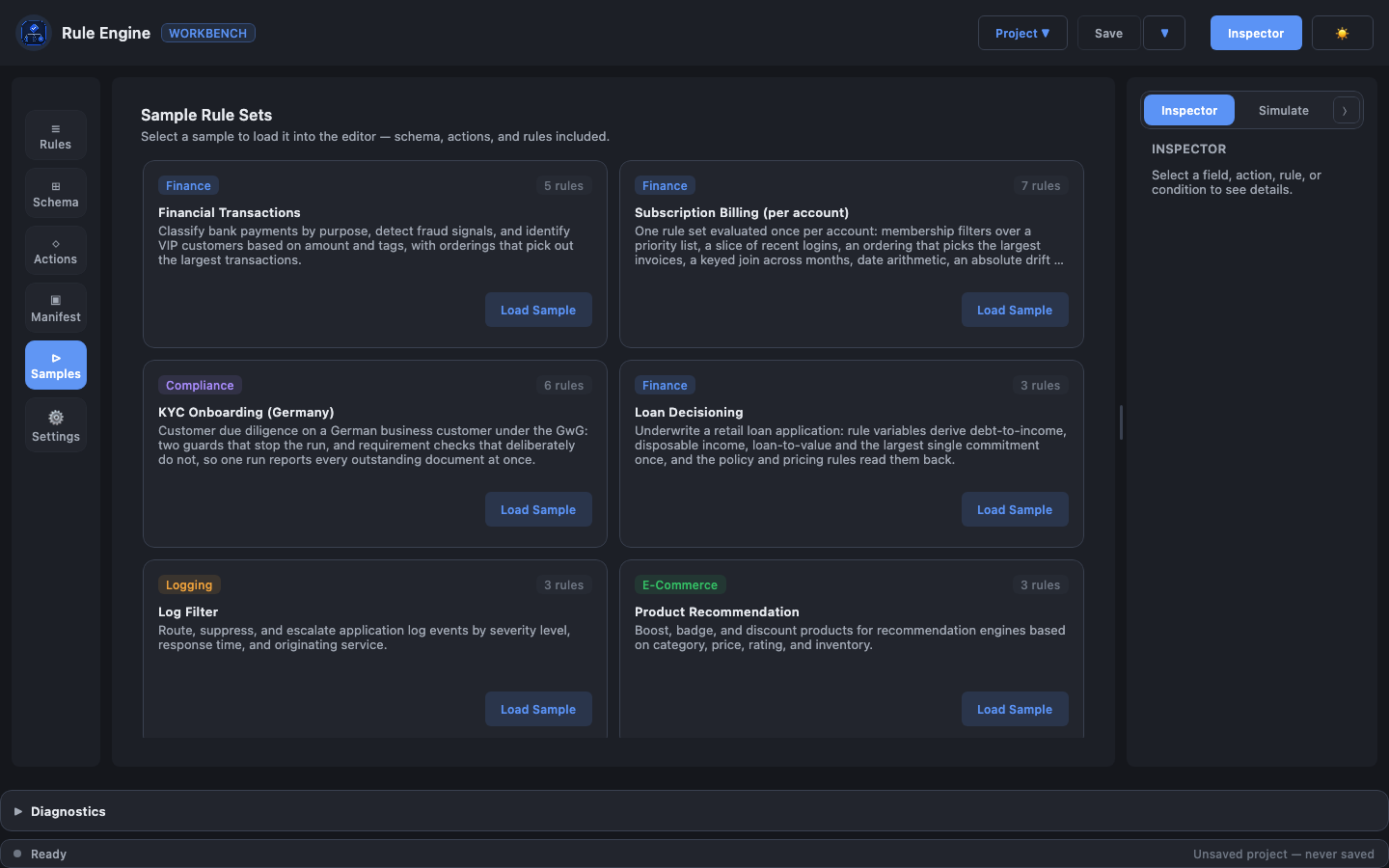
The sample gallery — every bundled project, loadable without touching the file system:
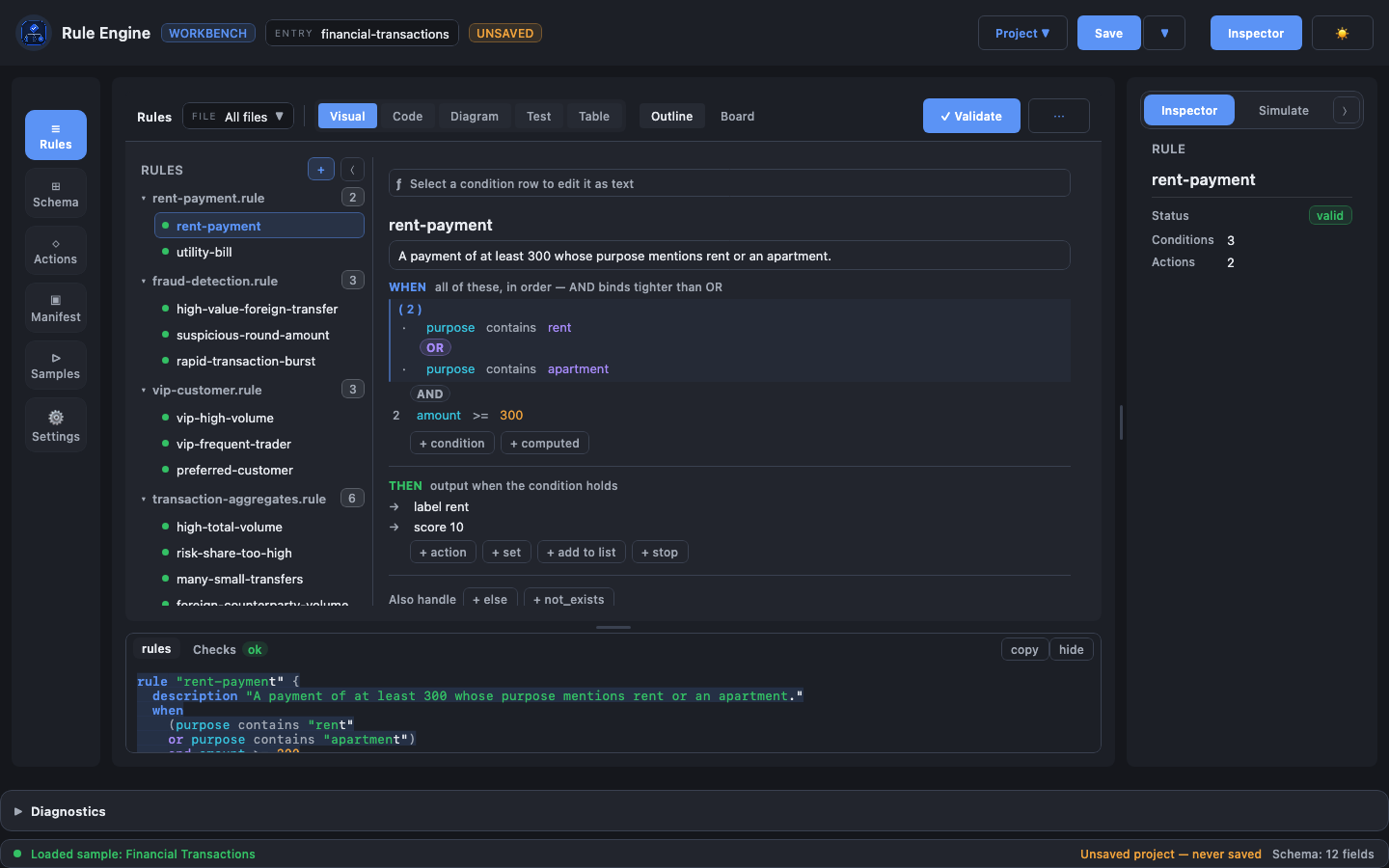
The rule builder, with the financial-transactions sample open: rule tree on the left, the selected
rule’s WHEN conditions on the right.
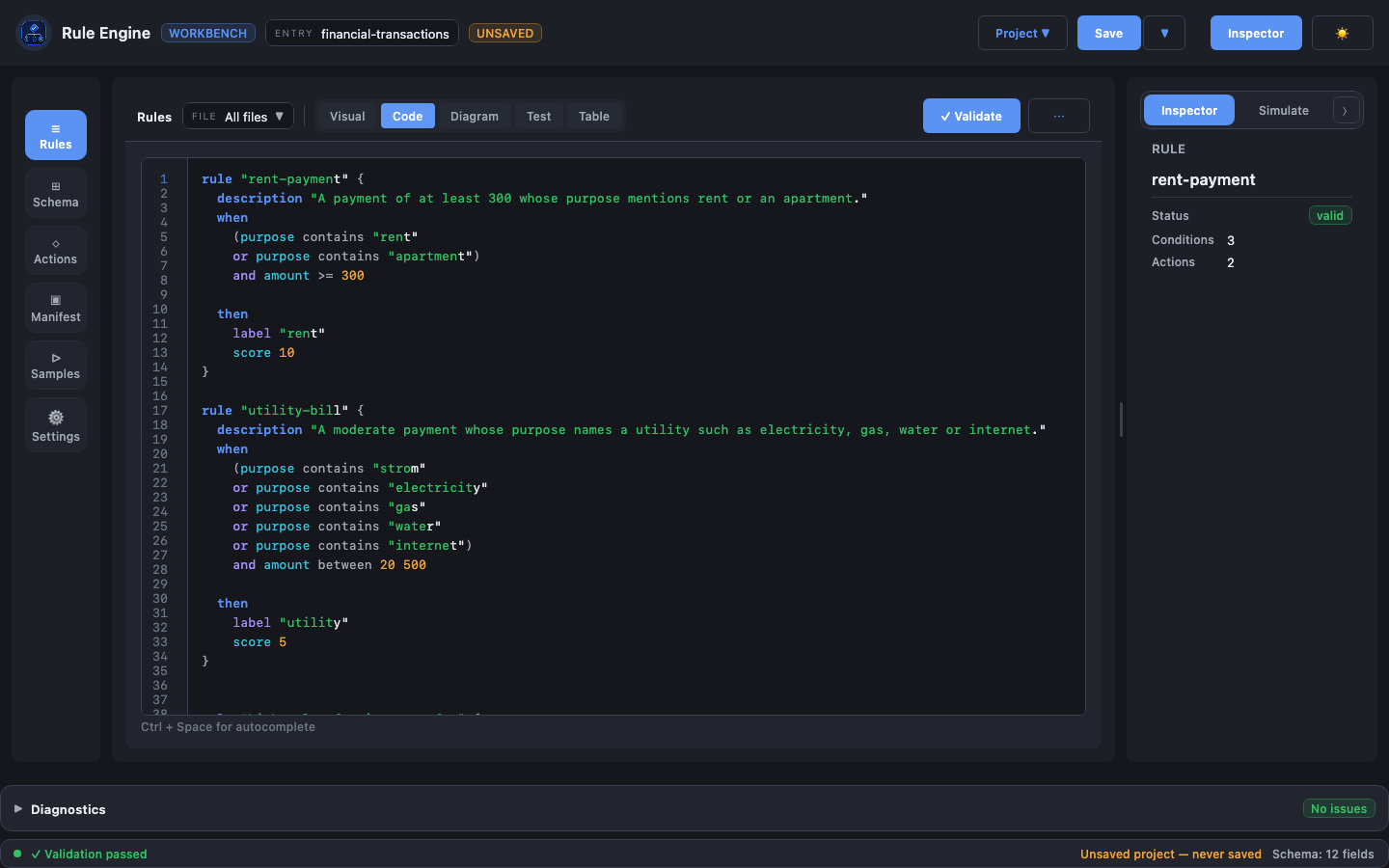
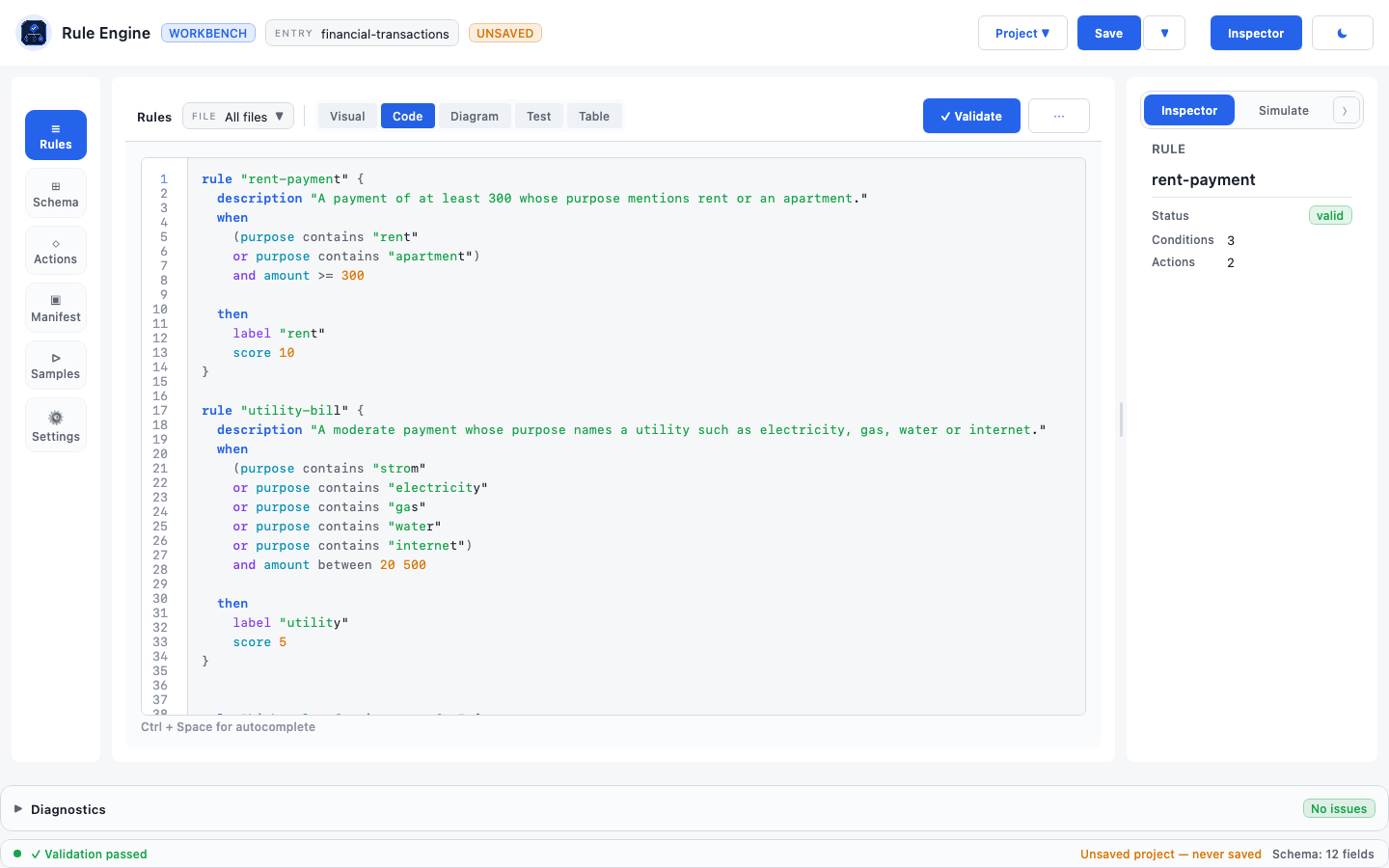
The same rules in the code view — plain .rule text, syntax highlighted. The whole editor comes in a
dark and a light palette, switched with the ☀ / ☾ button in the top bar:
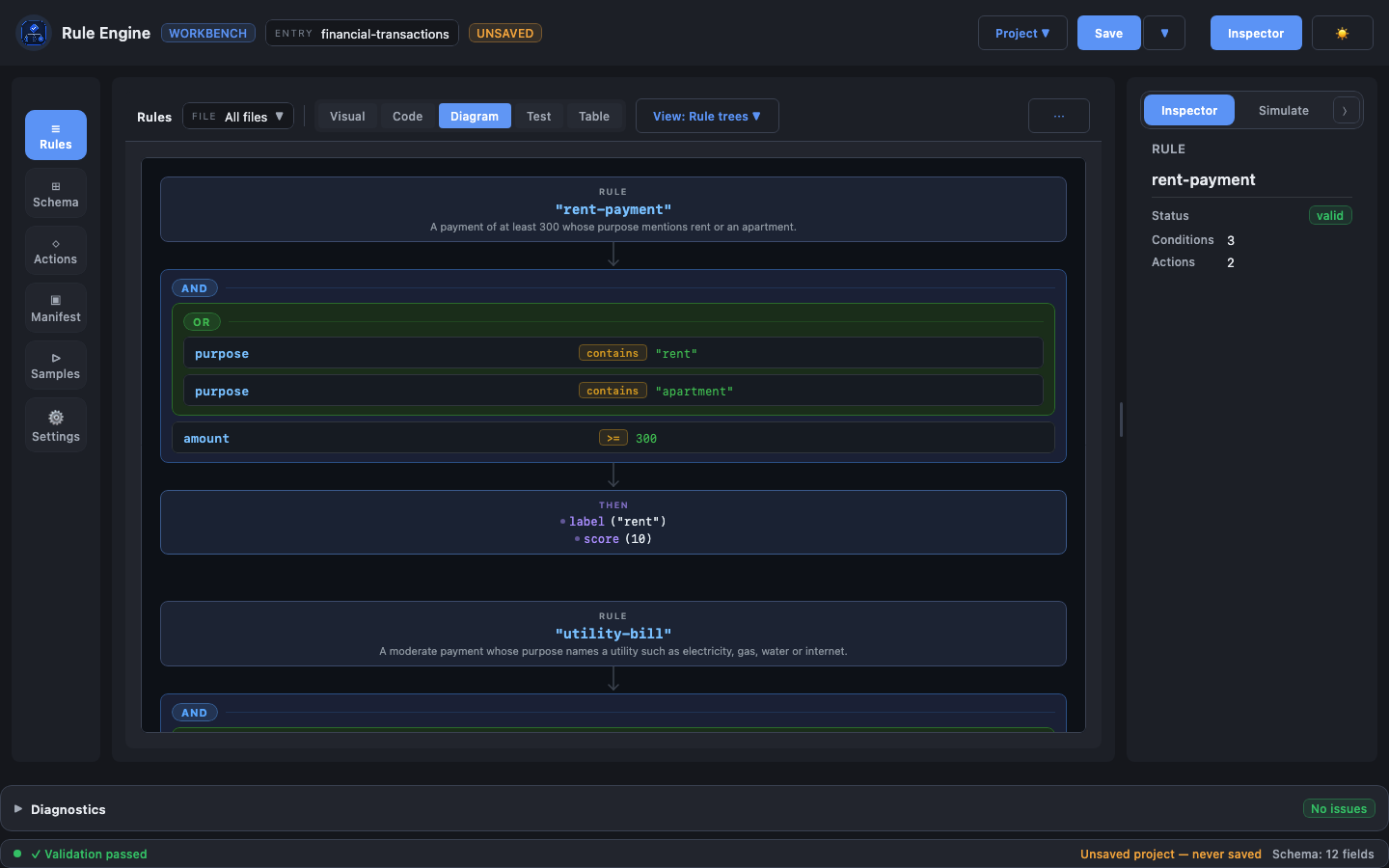
The rule trees diagram, one condition tree per rule:
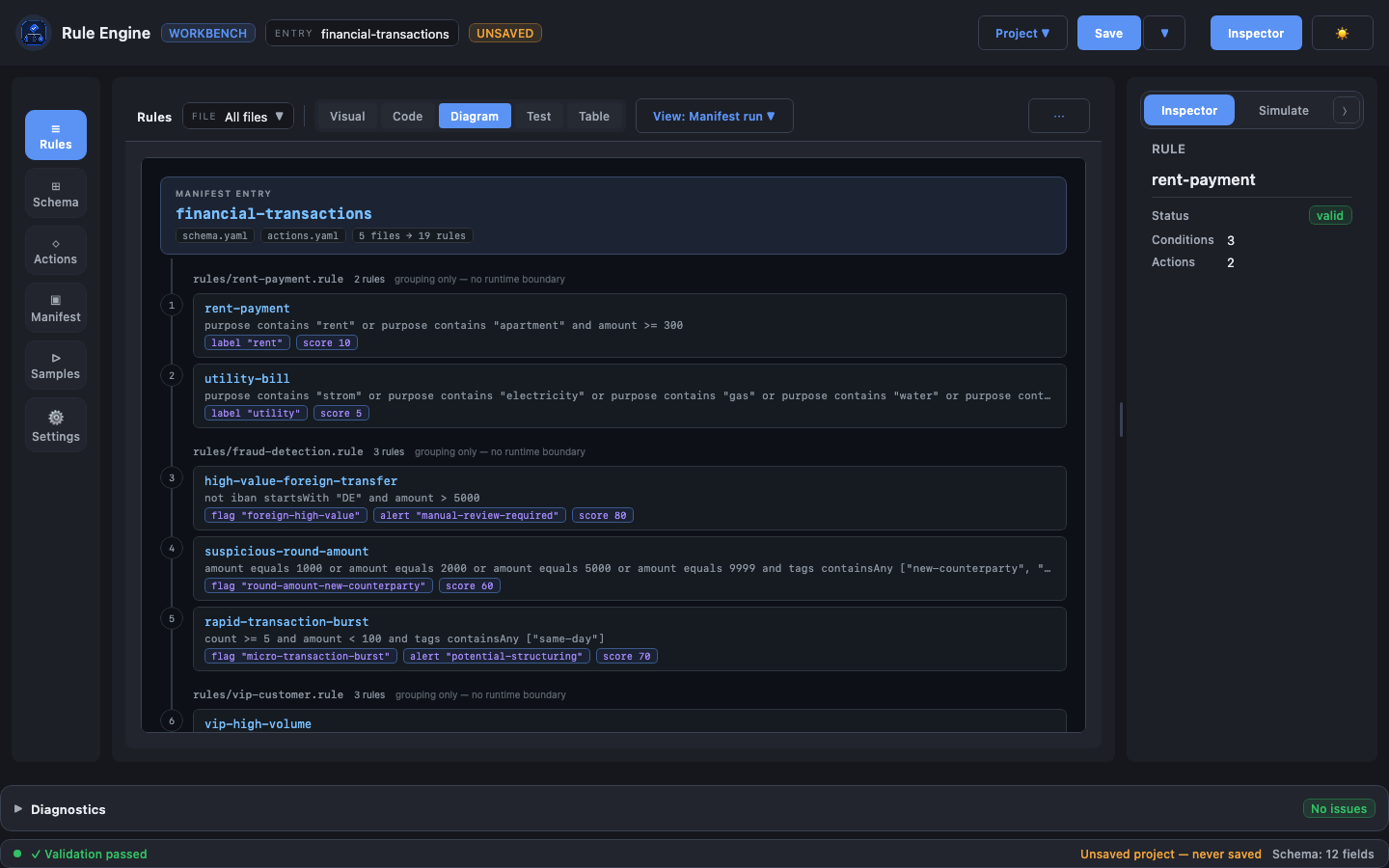
The manifest run diagram — the whole entry on one spine, in evaluation order:
These are rendered off-screen from the real app by DocScreenshotsTest, which is skipped unless asked
for:
./gradlew :ruleengine-ui:jvmTest -PdocScreenshots=true --tests '*DocScreenshotsTest*'
What the editor gives you
| Area | What you can do |
|---|---|
| Sample gallery | Open a ready-made project — financial transactions, KYC onboarding, loan decisioning, log filter, product recommendation, access control, warehouse shipments — without touching the file system. Each carries its own manifest, so the diagram views work straight away |
| Schema editor | Read the whole input contract as an outline — one line per field, with its type, its normalizer chain in order, its operators, and how many rules read it — then edit whatever you select in the Inspector. Nested collection / object members sit on a bracket rail. Actions read the same way, as the call a rule makes: audit(string, integer) |
| Manifest editor | The project on one screen: each entry’s files and scope on a rail, its rule files numbered in run order, each carrying what it publishes (↑$tier) and what it reads (↓$tier). A read no earlier file publishes is called out where it happens — the rule parses, runs and silently never fires, and only the file order decides it. The schema and actions paths are links into those areas; reordering and adding happen in the Inspector, because the order is the run order |
| Preview dock | Under every editor: the file it is about to write, read-only and syntax-highlighted, with whatever you have selected marked inside it — the open rule and the condition row you clicked, or the selected field, action or manifest entry. Beside it, a Checks tab carrying the problem count on the tab, so you see it before opening — click a check to select the declaration it is about — and a Usages tab holding the flow diagram, so seeing which rules read a field no longer replaces the field. Drag the top edge to resize, double-click to reset; the height is remembered. Open by default in the builder, closed elsewhere |
| Rule builder | Two canvases over one rule, switched in the area header beside the mode tabs. The outline reads the whole rule top to bottom, one line per condition, with AND/OR on the gutter and groups as bracket rails. The board shows every rule in evaluation order along the top, then this rule as draggable condition rails and three outcome lanes side by side. Both edit through the same right-hand Inspector, and the selection survives the switch — and both share the same preview dock below |
| Formula bar | The selected condition as editable text. Type count(invoices) > 2 and the row rebuilds; the row’s own DSL appears there when you click it. Validated as you type, applied on ⏎, and nothing is applied unless it parses |
| Code view | Edit the DSL directly, with syntax highlighting, autocompletion and inline diagnostics |
| Diagram view | Four diagrams over the same rules, picked in the area header: the rule trees (each rule’s condition tree), the manifest run (the whole entry on one spine, in evaluation order), the outcome map (rules grouped by the output they produce, from any branch) and the field flow (schema field → rule → outcome, with the fields no rule reads) |
| Table view | Scan all loaded rules, their conditions and their actions at a glance |
| Inspector | Describe and edit what is selected, in the right-hand panel — drag its left edge to make it wider when a deep expression needs the room: the rule you are editing — its status, condition and action counts per branch, and the variables it publishes — or a schema field or action, with how many rules use it. A manifest path can be typed or picked with Choose…, which writes it relative to the manifest — greyed out with the reason until the project has been saved, since there is nothing to be relative to before then. Opened with ⓘ Inspector in the application bar |
| Test panel | Evaluate the rule set against JSON input: every variable the run published and every action it emitted, both grouped by the rule responsible, plus one row per rule — matched, else, not exists, partial, no match, or not evaluated — whose condition trace expands on click |
The two bars
Every area is topped by the same header, in the same order: what this area is, the file it is
bound to, the Visual / Code tabs, and the actions — the primary verb keeps its label at any width,
the secondary ones fall back to their glyphs, and the rare ones live in the ⋯ menu. Rules adds
Diagram, Test and Table to the same strip, and its Outline / Board switch sits beside the tabs as
a subordinate pair, because it changes how one rule is drawn rather than what the panel is.
Above them all, the application bar answers where you are on the left — logo, the manifest entry,
and an UNSAVED marker when there is work not on disk — and what you can do on the right: a
Project menu (New, Open), a Save split button whose caret holds Save Project As… and the two
shared-file exports, then the Inspector and the ☀ / ☾ theme toggle. Its controls are words — at
this text size every download, open and expand arrow the fonts offer is a hairline, so Project ▼ and
Save say what they are; the sun and moon stay, because everyone reads those. As the window narrows
the bar gives up its identity rather than its controls: the wordmark first, then the WORKBENCH badge,
then the entry chip’s key. Nothing is dropped, and nothing overflows.
Advanced conditions in the builder
A condition row is one line of clickable text — the DSL it will generate, not a summary of it. Clicking
any part of it selects that part and the Inspector opens on it, so the aggregate inside
abs(sum(a) - sum(b)) is one click away and the row never changes height while you work on it.
Each side of a comparison is a field, a literal, an aggregate, a calculation or a function call:
- Aggregate — pick a reduction (
count,sum,avg,median,max,min,subtract) and build the path one segment at a time, attachingwherefilters to any segment. - Calculation — a flat list of terms joined by
+,-,*,/, with optional parentheses. - Function — any other call the engine knows (
abs,daysBetween,every,any,sumByKey), one argument per row. An argument is an operand in its own right, soabs(sum(invoices.amount) - sum(payments.amount))is a function around a calculation around two aggregates. Each level is reached by drilling into it, with one click back along the trail in the panel header.
The row’s form follows its operands. A plain field against a literal is a simple condition, and only
that form has the named operators — contains, between, in, startsWith. Once either side is
computed the row is a value-expression comparison, where only == != > >= < <= exist. You do not switch
between the two: choosing a computed operand is the switch. And where a named operator has no computed
spelling, the picker says so instead of converting — purpose contains "rent" cannot become an
arithmetic comparison, so the option is disabled with that reason rather than silently rewriting your
operator.
Path segments carry three things beyond their name, each on its own card and all visible at once — no drawer to open, because a silent filter is exactly what you must not have to go looking for:
- a where filter,
and-joined when there is more than one.intakes either a written-out list or the name of another field or list variable (priorityCustomerIds); switch that side to Field and name it, and it is emitted unquoted so it stays a membership test rather than becoming a text comparison. - an order by control, which is what
sortBygenerates: a member to order by (absent for astring_set, which orders by its own values) and a direction. It sits above the bound below, because that is almost always what is meant — ordering first and keeping three gives the three largest, while keeping three first puts an arbitrary three in order. - a first / last n bound, which is what
takeandtakeLastgenerate. It applies where it sits relative to the filters above it, because the order is the meaning:take(orders, 3)[paid == true]selects paid orders among the first three, whiletake(orders[paid == true], 3)selects the first three paid orders.
Under the outline is a collapsible strip showing the text this rule will become, with the line for the selected row highlighted. That is the bridge between the two ways of working: it is where you learn which line of DSL the row you are editing corresponds to.
The board
The board answers the question no other view can: what order do these rules run in, and what do they pass to each other.
- The ribbon along the top is every rule in evaluation order, grouped by file, numbered continuously
across files because the run does not restart at each file. Every card shows the same four rows — its
number and name,
↓what it reads,↑what it sets, and⊘if it halts the run — with a dash where a slot is empty, because an omitted row reads as unknown while a dash reads as none. - Clicking a
$variablechip lights up every rule that sets it and every rule that reads it. Only a rule earlier in the run publishes to a later one, so a rule reading a variable nothing before it sets is called out: that rule parses, validates, runs — and can never fire. whenis nested rails, a colour per depth. Drag a row onto another to bracket the two, or into an existing group to join it. A drop that would not work says why rather than springing back.- The three outcomes sit side by side, all always shown, each stating when it runs. Drag a card
between lanes to move an action or an assignment from one branch to another. Moving the last
thenaction is refused, because a rule with an emptythendoes not parse.
Variables in the builder
A rule can publish a value for the rules after it with a set clause. + Variable in the THEN
block adds a set name = operand row, whose right-hand side is the same operand chip a condition row
uses — so a variable can hold a field, a literal, an aggregate or a calculation.
Variables that are in scope at the rule you are editing appear in the operand pickers as $name,
alongside the schema fields. “In scope” follows the engine: only variables published by a rule
earlier in the manifest’s rule order are offered, so the builder cannot produce a forward reference.
The code view offers the same names through autocompletion, plus the set keyword itself.
The rule inspector lists what the selected rule publishes, and the test panel shows the value each variable actually took for the input you ran.
Only extract clauses are still code-only; a rule using one — in either branch — opens read-only in
the builder with an explanation.
The else branch in the builder
A rule can say what to produce when its condition is false. + Else branch under the THEN card adds the block and its first action; from then on the ELSE card behaves exactly like THEN, with its own + Action and + Variable buttons and the same row editors.
Removing the last row from the ELSE card drops the branch and the button comes back. That is deliberate
rather than a separate toggle: an empty else does not parse, so “the block exists” and “the block has
something in it” are the same state in the DSL, and the builder keeps them the same state too.
The test panel reports an else result as its own else status, in its own filter and count — never as
“matched”, because the rule’s condition was false. The rule inspector shows an Else actions row for a
rule that has one, and the table view prefixes the else outputs with else so they do not read as
outputs the rule produces at the same time as its THEN ones.
The inspector
ⓘ Inspector in the top bar opens the right-hand panel; the narrow strip on the right edge does the same, and the panel remembers whether it was open. It describes whatever is selected.
For a rule that is its id, validation status, how many conditions and actions it has — with separate
rows for the else and not_exists blocks when it declares them — the variables it publishes, and its
own diagnostics. Which rule that is follows the selection you can already see: the rule tree, the table
and the builder header all mean the same rule. In code mode there is no such selection on screen, so the
caret is the selection — put the cursor in a rule block and the panel describes that rule.
The ⓘ button on a field row in the Schema area, or an action row in the Actions area, inspects that
one instead: its type, operators and normalizers, or its argument types, and how many rules use it. That
count is over the rules currently loaded, and it counts rules rather than mentions — a rule reading a
field twice counts once, and a rule emitting an action from both then and else counts once, because
only one branch of a rule ever runs.
Validating a whole project
With a manifest open, Validate checks the entire entry rather than the file on screen — every rule
file, in manifest order, exactly as the engine loads it. That is what catches the problems a single file
cannot show: a rule id repeated in another file, and a $variable that resolves only because an earlier
file publishes it.
Each row in the diagnostics panel names the file it came from when that is not the one you are looking at, and clicking it opens that file at the line. Underlines in the editor only ever come from the open file: another file’s line 12 is not this file’s line 12.
While you type, the faster per-file pass keeps running on the open buffer, and it counts the variables the earlier files of the entry publish — so a rule that reads one is not reported as broken between keystrokes either.
The not-exists branch in the builder
A rule can also say what to produce when the record carries no data to decide its condition — an absent
field, a null, a variable no earlier rule published. + Not-exists branch adds the block and its
first action, and the NOT EXISTS card then behaves exactly like THEN and ELSE.
The cards are ordered THEN, ELSE, NOT EXISTS, which is the order the DSL requires: the generated text
writes not_exists after else, so a rule edited in the builder always parses back. Dropping the last
row drops the branch, the same way it does for ELSE.
The test panel reports it as its own not exists status, in its own filter and count, coloured orange
rather than green — the rule produced output, but without deciding. Its condition trace marks the
undecided rows orange too, so a run can be read back to the field that was not there. The rule inspector
shows a Not-exists actions row, and the table view prefixes those outputs with not_exists.
Branches in the outcome map
The outcome map groups rules by the value they can decide, and it counts every branch: a rule that
produces assessment "RED" from its else sits in the same bucket as one that produces it from its
then, with a small else or not_exists badge saying where it came from. A then entry carries no
badge, which is the common case.
That matters because the bucket’s own claim is a count — “2 rules can decide this” is a warning that a
record could pick the value up twice, or that two rules disagree. Reading only then blocks, as this
view used to, made that count wrong wherever an else decided the same value. A rule reaching one bucket
from two of its own branches still counts once: only one branch of a rule ever runs.
Ending the run in the builder
A branch can end the run with stop: the rules after it are not evaluated at all. + Stop on a branch
card adds it, and it then shows as a removable badge at the end of that branch — never as an editable row,
because there is nothing about a stop to edit.
The badge is always last, and stays last: the builder holds it as a flag on the branch rather than as an
entry in the action list, so adding more actions or variables afterwards cannot push output below it. The
generated DSL always writes stop as the block’s final statement, which is what the parser requires.
+ Stop disappears while a branch already has one.
The test panel shows the consequence directly: rules after the halt are reported as not evaluated rather than as no match — the run never tested them.
Embedding the core yourself
The UI is a thin layer over ruleengine-core. The same entry points are available to any application:
| Step | Call |
|---|---|
| Load a field schema | FieldSchemaLoader.loadFromString(content, nameHint) |
| Load an action schema | ActionSchemaLoader.loadFromString(content) |
| Parse rules | Parser(input = rulesText).parseRules() |
| Validate | Validator.validate(asts, schema, actions) |
| Compile | Compiler.compileRules(asts, schema) |
| Load a whole project | ManifestLoader |
See the Integration Guide for the full API, error handling and tracing.